


| | | Introduction |
Take the expression x2+y2+z2 <= 1, where the variables x, y and z range over the real numbers. This expression represents a set of values--its solution set, which is a ball. We call such an expression a constraint. Solving a constraint means to find some interesting information about its solution set, where the definition of "interesting" depends on the application. For example, we might want to find a point in the solution set, or we might want to find an approximation of the solution set by hyper-rectangles.
This software package solves a special type of constraints, namely quantified constraints. Take the following example: exist z in [-2, 2] x2+y2+z2 <= 1. Here we encounter the symbol exist --an existential quantifier. The solution set of this constraint is the set of all x and y such that there is a z such that x2+y2+z2 <= 1 holds. Clearly this is a disc, that is, the projection of the solution set of x2+y2+z2 <= 1 onto the two-dimensional real space. Such a projection can be very convenient, because one can easily visualize sets in two-dimensional real space.
A quantified constraint can also contain the symbol forall , that is, universal quantifiers. This can be very useful for dealing with uncertain values. These occur, for example, in robust control [4], where one studies notions such as the stability of systems under uncertain values.
A quantified constraint can also contain the Boolean symbols for conjunction and disjunction. In general, it is a formula in the first-order predicate language [5] over the reals.
Traditionally, such constraints have been solved by symbolic methods [15][2][3]. However, these methods suffer from various drawbacks--especially for inputs that model real-world problems. Instead of symbolic solutions, the algorithm [10] employed in this software computes solutions that are approximate but correct.
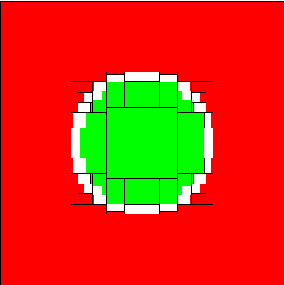
For example, in Figure * you can see a visualization of the solution computed for the constraint exist z in [-2, 2] x2+y2+z2 <= 1. Here you can see a green area--elements that are guaranteed to be within the solution set, a read area--elements that are guaranteed to be out of the solution set, and a white area--elements for which we do not have any information.
The user can specify an error bound--the maximum allowed fraction of the white area wrt. the total area. For example, the error bound used for Figure *, was 0.05.
| | | Introduction |